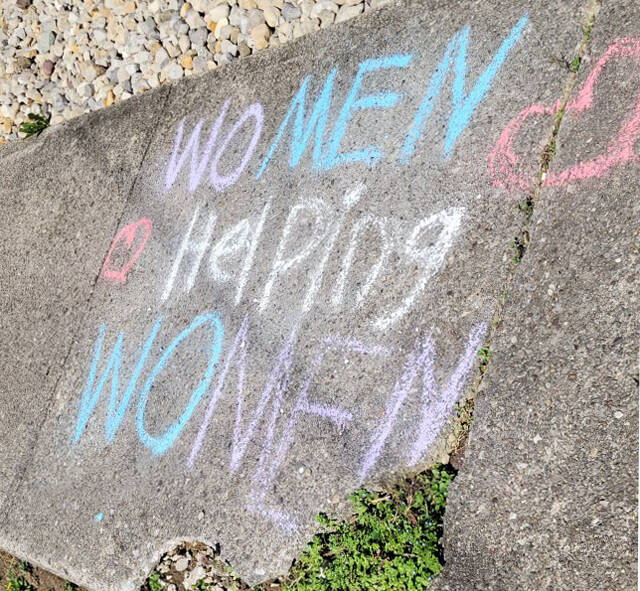
Once again this year for Sexual Assault Awareness Month (April), Women Helping Women asked local businesses and agencies to participate in the “Chalk the Walk” Event. The task was simple: April 13 and 14 chalk the sidewalk at your establishment with a note of encouragement to survivors of sexual assault.
This has been a very successful campaign in Adams and Brown Counties the last few years, led by Davina Cooper, the Rural Program Manager for Women Helping Women. Women Helping Women provides local court and hospital accompaniment, one-on-one crisis counseling, operates a 24-hour hotline and currently offers virtual support groups. They expanded their sexual assault services to both Adams and Brown Counties in January of 2017. All services are free and confidential. Davina Cooper can be reached at (513) 262-1788.
Weather made it challenging, but was nothing compared to the challenges survivors face. If you or someone you know are in need of services please do not hesitate to reach out on our 24/7 hotline which also now features a text to chat option. (513) 381-5610
Over 20 local agencies and businesses participated in “Chalk the Walk” including: Adams County Board of DD, Adams County Homeless Shelter, West Union High School, Mosier’s Furniture, Blake Pharmacy, Shelton Law Office, Ohio Country Properties: Huff Realty, Venture Productions Inc., Raven Perch Tattoo Studio, DC Engineering & Consulting, West Union Electric & Plumbing, FRS, Tan & Tone and Creative Spark Studio.
An upswing of domestic violence was a feared consequence of the coronavirus pandemic. Now Hamilton County has evidence for it.
Women Helping Women, the southwest Ohio nonprofit that advocates and cares for victims of gender-based violence, reported Thursday it had registered a 23% increase in the number of clients from March 16 to June 30 compared to the same period a year ago.
The agency’s analysis also showed calls to its hotline jumped 53% this year over the same 14 weeks when compared to the 2019 time frame.
“COVID doesn’t cause gender-based violence. Economic stress doesn’t cause gender violence,” said Kristin Shrimplin, the agency’s president and chief executive officer. “It just adds fuel to the fire.”
In March, Shrimplin said, calls for help rose rapidly, about 20%. After the stay-at-home order was issued in mid-month, the calls dropped because, Shrimplin said, fewer domestic violence survivors could feel safe calling a hotline while at home full time with a perpetrator.
Lt. Col. Mike John of the Cincinnati Police Department works with Shrimplin on a dedicated unit that responds to domestic violence calls with police and WHW advocates. John said that even though police haven’t seen a jump in criminal reports, he is not surprised by the increase in hotline calls.
“It’s not like a simple assault at a bar,” he said. “We are very much dedicated to finding who that aggressor is and removing him from that situation. They (Women Helping Women advocates) are left to pick up the pieces.”
Women Helping Women provides that support, he said, no matter if the survivor decides to press charges.
Domestic incidents have been more violent
Shrimplin said she found another cause for alarm. More people calling the hotline had experienced brutal assaults that can be omens of fatal violence in intimate relationships.
“Strangulation, sexual assault, use of weapons, they were all up,” Shrimplin said.
Women Helping Women, like many such agencies in the United States, uses the Danger Assessment tool, a system of identifying particular domestic violence – non-fatal strangulation, for example – that can lead to femicide, the killing of a woman.
The dedicated group of WHW advocates and Cincinnati police working together is called Domestic Violence Enhanced Response Team, or DVERT. Advocates go on domestic violence calls with police to help survivors.
“What we were hearing on those calls, what we were seeing on scene with survivors, they were getting increased red flags to be killed compared to last year,” Shrimplin said.
New victims
The Women Helping Women report also found people who’d never before experienced physical violence at home now calling for help.
It’s an unsurprising development. The Substance Abuse and Mental Health Services Administration’s report on intimate-partner violence during the pandemic notes that loss of jobs, income in general, a disconnect of social services and help groups, a fear of getting COVID-19 and other issues now “may stimulate violence in families where it didn’t exist before and worsen situations in homes where mistreatment and violence has been a problem.”
The April shootings
In April, six female-identified victims were fatally shot in Hamilton County, compared to five for all of 2019. The Women Helping Women report said, “While COVID-19 was not cause of death, the impact on how society functioned greatly increased the harm and lethality of individuals who were already facing long standing system barriers to safety and resources.”
Shrimplin said criminal reports will lag the number of calls to the agency’s hotline. “If people show up to hospitals and work with us, if we show up at different community points, if they call our hotline, that doesn’t mean that the survivors engage with the justice system.”
John of the Cincinnati police said of WHW, “That’s why their expertise is so important.”
How can victims get help
Women Helping Women has stepped up its services.
In April, with no additional funding, the agency added text-ability to its hotline.
Its volunteers bring masks, hand sanitizers and other personal protection products to the survivors it serves.
When possible, the agency provides families gift cards for groceries or Lyft rides.
The state of Ohio is funneling new money to programs for domestic violence survivors.
Attorney General Dave Yost announced $8.75 million from the federal CARES Act would go to support rape crisis centers and domestic violence shelters, in addition to $1 million to combat COVID-19 scams throughout the state.
Gov. Mike DeWine also announced that 66 local victim service projects have been awarded a total of $3.2 million to support victims of crime. The projects will be funded by grants through the Family Violence Prevention & Services Act grants program.
If you are threatened or harmed or know someone who may be in danger, call or text the Women Helping Women hotline: 513-381-5610.
This mode enables people with epilepsy to use the website safely by eliminating the risk of seizures that result from flashing or blinking animations and risky color combinations.
Visually Impaired Mode
Improves website's visuals
This mode adjusts the website for the convenience of users with visual impairments such as Degrading Eyesight, Tunnel Vision, Cataract, Glaucoma, and others.
Cognitive Disability Mode
Helps to focus on specific content
This mode provides different assistive options to help users with cognitive impairments such as Dyslexia, Autism, CVA, and others, to focus on the essential elements of the website more easily.
ADHD Friendly Mode
Reduces distractions and improve focus
This mode helps users with ADHD and Neurodevelopmental disorders to read, browse, and focus on the main website elements more easily while significantly reducing distractions.
Blindness Mode
Allows using the site with your screen-reader
This mode configures the website to be compatible with screen-readers such as JAWS, NVDA, VoiceOver, and TalkBack. A screen-reader is software for blind users that is installed on a computer and smartphone, and websites must be compatible with it.
Online Dictionary
Readable Experience
Content Scaling
Default
Text Magnifier
Readable Font
Dyslexia Friendly
Highlight Titles
Highlight Links
Font Sizing
Default
Line Height
Default
Letter Spacing
Default
Left Aligned
Center Aligned
Right Aligned
Visually Pleasing Experience
Dark Contrast
Light Contrast
Monochrome
High Contrast
High Saturation
Low Saturation
Adjust Text Colors
Adjust Title Colors
Adjust Background Colors
Easy Orientation
Mute Sounds
Hide Images
Hide Emoji
Reading Guide
Stop Animations
Reading Mask
Highlight Hover
Highlight Focus
Big Dark Cursor
Big Light Cursor
Cognitive Reading
Virtual Keyboard
Navigation Keys
Voice Navigation
Accessibility Statement
womenhelpingwomen.org
October 17, 2026
Compliance status
We firmly believe that the internet should be available and accessible to anyone, and are committed to providing a website that is accessible to the widest possible audience,
regardless of circumstance and ability.
To fulfill this, we aim to adhere as strictly as possible to the World Wide Web Consortium’s (W3C) Web Content Accessibility Guidelines 2.1 (WCAG 2.1) at the AA level.
These guidelines explain how to make web content accessible to people with a wide array of disabilities. Complying with those guidelines helps us ensure that the website is accessible
to all people: blind people, people with motor impairments, visual impairment, cognitive disabilities, and more.
This website utilizes various technologies that are meant to make it as accessible as possible at all times. We utilize an accessibility interface that allows persons with specific
disabilities to adjust the website’s UI (user interface) and design it to their personal needs.
Additionally, the website utilizes an AI-based application that runs in the background and optimizes its accessibility level constantly. This application remediates the website’s HTML,
adapts Its functionality and behavior for screen-readers used by the blind users, and for keyboard functions used by individuals with motor impairments.
If you’ve found a malfunction or have ideas for improvement, we’ll be happy to hear from you. You can reach out to the website’s operators by using the following email
Screen-reader and keyboard navigation
Our website implements the ARIA attributes (Accessible Rich Internet Applications) technique, alongside various different behavioral changes, to ensure blind users visiting with
screen-readers are able to read, comprehend, and enjoy the website’s functions. As soon as a user with a screen-reader enters your site, they immediately receive
a prompt to enter the Screen-Reader Profile so they can browse and operate your site effectively. Here’s how our website covers some of the most important screen-reader requirements,
alongside console screenshots of code examples:
Screen-reader optimization: we run a background process that learns the website’s components from top to bottom, to ensure ongoing compliance even when updating the website.
In this process, we provide screen-readers with meaningful data using the ARIA set of attributes. For example, we provide accurate form labels;
descriptions for actionable icons (social media icons, search icons, cart icons, etc.); validation guidance for form inputs; element roles such as buttons, menus, modal dialogues (popups),
and others. Additionally, the background process scans all the website’s images and provides an accurate and meaningful image-object-recognition-based description as an ALT (alternate text) tag
for images that are not described. It will also extract texts that are embedded within the image, using an OCR (optical character recognition) technology.
To turn on screen-reader adjustments at any time, users need only to press the Alt+1 keyboard combination. Screen-reader users also get automatic announcements to turn the Screen-reader mode on
as soon as they enter the website.
These adjustments are compatible with all popular screen readers, including JAWS and NVDA.
Keyboard navigation optimization: The background process also adjusts the website’s HTML, and adds various behaviors using JavaScript code to make the website operable by the keyboard. This includes the ability to navigate the website using the Tab and Shift+Tab keys, operate dropdowns with the arrow keys, close them with Esc, trigger buttons and links using the Enter key, navigate between radio and checkbox elements using the arrow keys, and fill them in with the Spacebar or Enter key.Additionally, keyboard users will find quick-navigation and content-skip menus, available at any time by clicking Alt+1, or as the first elements of the site while navigating with the keyboard. The background process also handles triggered popups by moving the keyboard focus towards them as soon as they appear, and not allow the focus drift outside it.
Users can also use shortcuts such as “M” (menus), “H” (headings), “F” (forms), “B” (buttons), and “G” (graphics) to jump to specific elements.
Disability profiles supported in our website
Epilepsy Safe Mode: this profile enables people with epilepsy to use the website safely by eliminating the risk of seizures that result from flashing or blinking animations and risky color combinations.
Visually Impaired Mode: this mode adjusts the website for the convenience of users with visual impairments such as Degrading Eyesight, Tunnel Vision, Cataract, Glaucoma, and others.
Cognitive Disability Mode: this mode provides different assistive options to help users with cognitive impairments such as Dyslexia, Autism, CVA, and others, to focus on the essential elements of the website more easily.
ADHD Friendly Mode: this mode helps users with ADHD and Neurodevelopmental disorders to read, browse, and focus on the main website elements more easily while significantly reducing distractions.
Blindness Mode: this mode configures the website to be compatible with screen-readers such as JAWS, NVDA, VoiceOver, and TalkBack. A screen-reader is software for blind users that is installed on a computer and smartphone, and websites must be compatible with it.
Keyboard Navigation Profile (Motor-Impaired): this profile enables motor-impaired persons to operate the website using the keyboard Tab, Shift+Tab, and the Enter keys. Users can also use shortcuts such as “M” (menus), “H” (headings), “F” (forms), “B” (buttons), and “G” (graphics) to jump to specific elements.
Additional UI, design, and readability adjustments
Font adjustments – users, can increase and decrease its size, change its family (type), adjust the spacing, alignment, line height, and more.
Color adjustments – users can select various color contrast profiles such as light, dark, inverted, and monochrome. Additionally, users can swap color schemes of titles, texts, and backgrounds, with over seven different coloring options.
Animations – person with epilepsy can stop all running animations with the click of a button. Animations controlled by the interface include videos, GIFs, and CSS flashing transitions.
Content highlighting – users can choose to emphasize important elements such as links and titles. They can also choose to highlight focused or hovered elements only.
Audio muting – users with hearing devices may experience headaches or other issues due to automatic audio playing. This option lets users mute the entire website instantly.
Cognitive disorders – we utilize a search engine that is linked to Wikipedia and Wiktionary, allowing people with cognitive disorders to decipher meanings of phrases, initials, slang, and others.
Additional functions – we provide users the option to change cursor color and size, use a printing mode, enable a virtual keyboard, and many other functions.
Browser and assistive technology compatibility
We aim to support the widest array of browsers and assistive technologies as possible, so our users can choose the best fitting tools for them, with as few limitations as possible. Therefore, we have worked very hard to be able to support all major systems that comprise over 95% of the user market share including Google Chrome, Mozilla Firefox, Apple Safari, Opera and Microsoft Edge, JAWS and NVDA (screen readers).
Notes, comments, and feedback
Despite our very best efforts to allow anybody to adjust the website to their needs. There may still be pages or sections that are not fully accessible, are in the process of becoming accessible, or are lacking an adequate technological solution to make them accessible. Still, we are continually improving our accessibility, adding, updating and improving its options and features, and developing and adopting new technologies. All this is meant to reach the optimal level of accessibility, following technological advancements. For any assistance, please reach out to